Configuration Description
A micro app contains two main configuration files: app.config.js and components.config.js.
App Config (app.config.js)
Defines the micro app's basic info, permissions, data nodes, etc.
Basic Config
| Parameter | Type | Required | Description |
|---|---|---|---|
appJsonVersion | string | ✅ | Config file version, currently 1.1 is the latest |
author | string | ✅ | Author identifier, used to generate the component tag name prefix. Must not contain special characters |
microAppId | string | ✅ | Unique app identifier, format is author-appname |
version | string | ✅ | Version number, following semantic versioning |
entry | string | ✅ | Entry file path, such as 'main.js' |
icon | string | ✅ | App icon file name (located in the public directory) |
debug | boolean | Debug mode. The backend can view API requests and data node debug data via command line; the frontend can view other debug data via the console. Default: false. |
App Info (appInfo)
Basic app info. To support multiple languages, parameters support i18n, such as $t:APP_NAME.
Parameters:
| Parameter | Type | Required | Description |
|---|---|---|---|
appName | string | ✅ | App name |
description | string | - | App description |
networkDescription | string | - | Network request description |
appJsonVersion:'1.1' vs old version (1.0) format update notes
// 1.1 without i18n support:
appInfo: {
  appName: 'Hello World',
  description: 'Micro App Hello World',
  networkDescription: 'No need to link to any third-party websites',
}

// 1.1 with i18n support:
appInfo: {
  appName: '$t:APP_NAME',
  description: '$t:APP_DESCRIPTION',
  networkDescription: '$t:NETWORK_DESCRIPTION',
}

// i18n file: locales/en-US.json
export default {
  // App basic info
  APP_NAME: 'Hello World',
  APP_DESCRIPTION: 'Micro App Hello World',

  // Network configuration
  NETWORK_DESCRIPTION: 'No need to link to any third-party websites'

  // ...
}

// i18n file: locales/zh-CN.json
export default {
  // App basic info
  APP_NAME: 'Hello World',
  APP_DESCRIPTION: 'Sun-Panel Demo Micro App',

  // Network configuration
  NETWORK_DESCRIPTION: 'No need to link to any third-party websites'

  // ...
}// 1.0 old format (will gradually stop being supported after the Sun-Panel official release, please update your base template as soon as possible):
appInfo: {
'zh-CN': {
appName: 'Weather',
description: 'View weather data worldwide',
networkDescription: 'Download necessary config data on first run'
},
'en-US': {
appName: 'Weather',
description: 'View weather data worldwide',
networkDescription: 'Download necessary config data on first run'
}
}Permission Config (permissions)
Declare the permissions required by the app, such as network requests, data nodes, etc. See Permission Declaration.
Network Domain Whitelist (networkDomains)
When declaring the network permission, you must configure the whitelist of allowed domains. See Permission Declaration.
Data Node Config (dataNodes)
Configure the app's persistent data storage nodes. See Data Nodes.
Complete Example
./config/app.config.js file content:
export default {
  // Basic info
  appJsonVersion: '1.1',
  author: 'hslr',
  microAppId: 'hslr-weather',
  version: '1.0.0',
  entry: 'main.js',
  icon: 'logo.png',
  debug: false,

  // i18n translation config
  i18n: translations,

  // App info
  appInfo: {
    appName: 'Weather',
    description: 'View weather data worldwide',
    networkDescription: 'Connect to third-party weather API',
  },

  // Permission config
  permissions: [
    'network',     // network permission
    'dataNode'     // data node permission
  ],

  // Network domain whitelist
  networkDomains: [
    'api.example.com'
  ],

  // Data node config
  dataNodes: {
    // Node name
    config: {
      scope: 'app',
      isPublic: true
    }
  }
};export default {
// Basic info
author: 'hslr',
microAppId: 'hslr-weather',
version: '1.0.0',
entry: 'main.js',
icon: 'logo.png',
debug: false,
// i18n info
appInfo: {
'zh-CN': {
appName: 'Weather',
description: 'View weather data worldwide',
networkDescription: 'Download necessary config data on first run'
},
'en-US': {
appName: 'Weather',
description: 'View weather data worldwide',
networkDescription: 'Download necessary config data on first run'
}
},
// Permission config
permissions: [
'network', // network permission
'dataNode' // data node permission
],
// Network domain whitelist
networkDomains: [
'api.example.com'
],
// Data node config
dataNodes: {
// Node name
config: {
scope: 'app',
isPublic: true
}
}
}Component Config (components.config.js)
Defines the basic info of the micro app's page components and widget components.
Complete Example
Version notes
appJsonVersion:1.1 adds the widgetName, widgetDescription, and sort fields, with i18n support.
import HelloWorldConfig from '../src/components/widgetConfig.js';
import HelloWorldWidget from '../src/components/widget.js';

export default {
  // Page registration
  pages: {
    'hello-world-config': {
      component: HelloWorldConfig,
      background: 'linear-gradient(135deg, #667eea 0%, #764ba2 100%)',
      backgroundDark: 'linear-gradient(135deg, #1a1a2e 0%, #16213e 100%)',
      headerTextColor: '#ffffff',
      headerTextColorDark: '#e0e0e0',
    }
  },

  // Widget registration
  widgets: {
    'hello-world-widget': {
      component: HelloWorldWidget,
      configComponentName: 'hello-world-config',
      // Fields added in appJsonVersion:1.1
      widgetName: 'Demo Widget',
      widgetDescription: 'Demo Widget Description',
      sort: 10, // Sort weight, smaller numbers come first
      size: ['1x1', '1x2', '2x1', '2x2', '2x4', '1xfull'],
      background: '',
    },
  },
};Page Component Types
The micro app's page components are divided into two types:
| Type | Identifier | Description |
|---|---|---|
| Widget Config Component | config | Opens as a guided page when adding a widget, or via the widget's right-click menu "Widget Config" |
| Main Page Component | main | Opens from a unified entry at the same micro app list location (unified entry not yet implemented), or anywhere within the micro app using this.api.window.open("main page name") |
You can specify the page type via the type field, defaulting to config.
Page Config Parameters
| Parameter | Type | Required | Description |
|---|---|---|---|
component | class | ✅ | Page component class |
background | string | - | Background style (CSS background property), default: #ffffff (white) |
backgroundDark | string | - | Background style in dark mode, follows background when empty |
headerTextColor | string | - | Header text color, default: #000000 (black) |
headerTextColorDark | string | - | Header text color in dark mode, follows headerTextColor when empty |
width | number | string | - | Window width, in px when a number, default: 800 |
height | number | string | - | Window height, in px when a number, default: 600 |
showFullscreenBtn | boolean | - | Whether to show the fullscreen button, default: false |
resize | boolean | - | Whether to allow resizing the window, default: false |
move | boolean | - | Whether to allow moving the window, default: false |
type | string | - | Page type, values: main (main page), config (widget config page), default: config |
Widget Config Parameters
| Parameter | Type | Required | Description |
|---|---|---|---|
component | class | ✅ | Widget component class |
configComponentName | string | - | Corresponding config page name (when configured, opens the page config component window when adding a component or via the widget's right-click menu) |
widgetName | string | - | Widget display name (added in 1.1, supports $t: syntax) |
widgetDescription | string | - | Widget description (added in 1.1, supports $t: syntax) |
sort | number | - | Sort weight, smaller numbers come first (added in 1.1) |
size | string[] | ✅ | Supported grid sizes |
background | string | - | Default background color |
Supported Grid Sizes
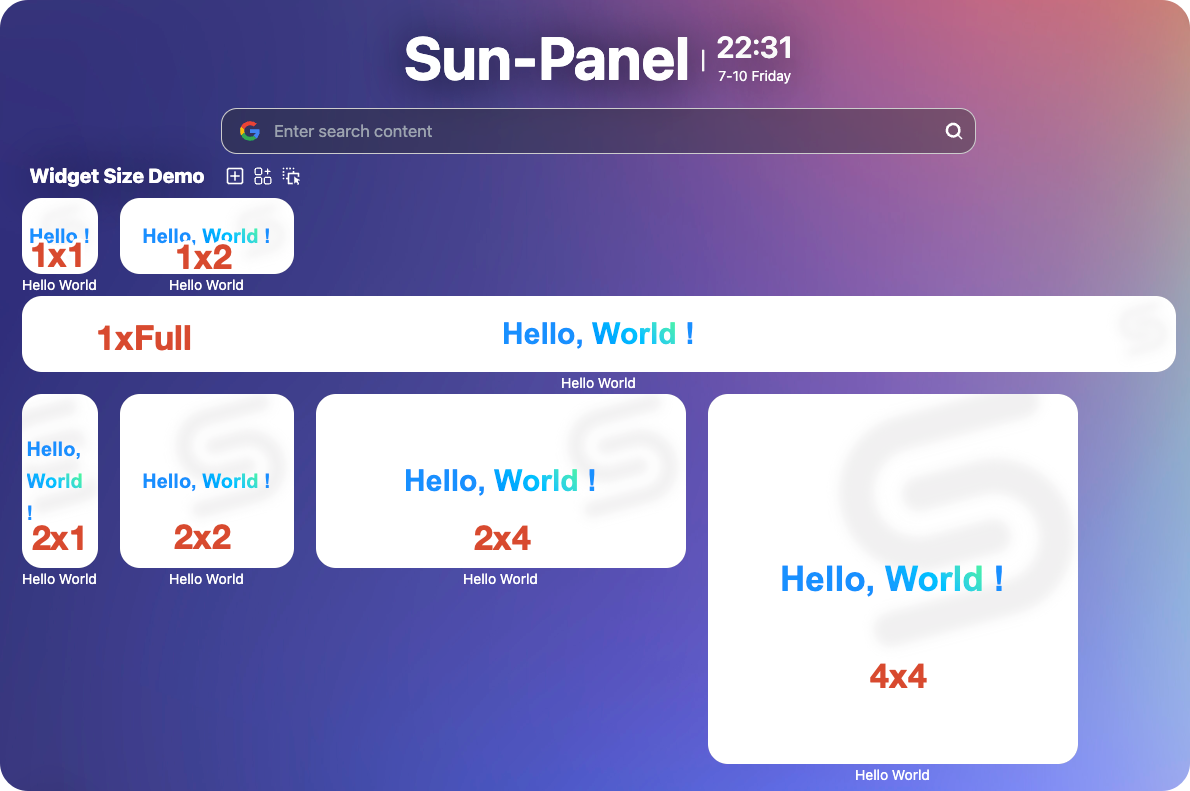
| Size | Description (row x column) | Use Case |
|---|---|---|
1x1 | 1 grid × 1 grid | Mini component |
1x2 | 1 grid × 2 grids | Vertical narrow card |
2x1 | 2 grids × 1 grid | Horizontal narrow card |
2x2 | 2 grids × 2 grids | Standard card |
2x4 | 2 grids × 4 grids | Large card |
4x4 | 4 grids × 4 grids | Large card |
1xfull | 1 grid × full screen width | Full-width display |
Naming Conventions
microAppId: Useauthor-featureformat, such ashslr-weather- Page name: Use lowercase letters and hyphens, such as
weather-config - Widget name: Use lowercase letters and hyphens, such as
weather-widget